 In a Minute Wassup AI
How to Make the Swiss Side Quest Trio Dance AI Video from Photos
Step-by-step guide to turning 1 to 3 adult portraits into the viral Swiss Side Quest hillside trio dance MP4 for TikTok and Reels without CapCut or prompts.
Quick summary
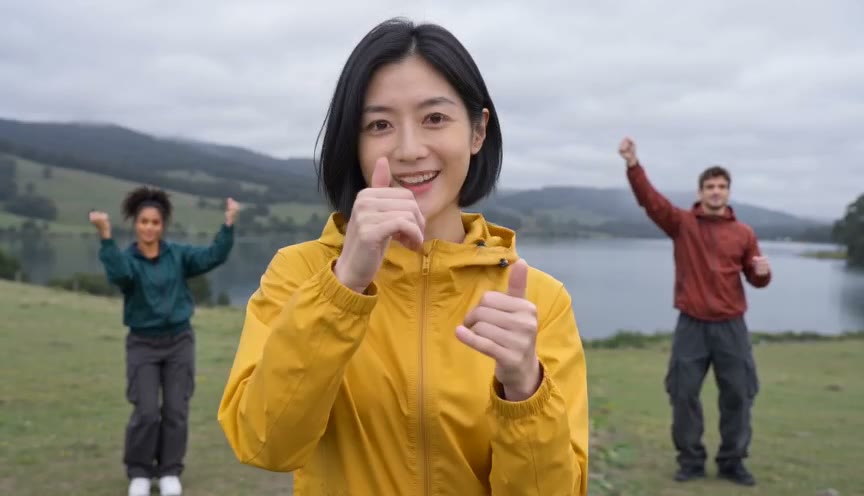
If you want to put yourself and your friends into the viral Swiss Side Quest trio hillside dance from Niana Guerrero's October 24, 2026 TikTok post, you do not need CapCut templates, source clip downloads, or prompt engineering. Upload 1 to 3 clear, front-facing adult portraits on the homepage studio, review the credit quote beside the generate button, and download your finished 15-second MP4 from My videos. Downloaded clips are silent MP4s so you can attach zbee's From Time Jersey club remix directly inside TikTok, Instagram Reels, or YouTube Shorts.
Which "In a Minute Wassup AI" version is this?
Searching Google or TikTok for in a minute wassup ai returns at least three distinct video styles. Knowing which version you saw prevents wasting time on the wrong generator or template:
| Viral Version | Setting & Cast | Visual Style | Supported Here? |
|---|---|---|---|
| Swiss Side Quest Trio Hillside Dance | 3 dancers on a misty lakeside green slope | Photorealistic live-action look based on Niana Guerrero's Oct 24, 2026 TikTok | Yes (dedicated studio) |
| White-Background Anime Sway | 1 illustrated character on a plain white backdrop | 2D anime or cartoon motion loop | No |
| Indoor Solo Dance Edit | 1 person dancing indoors in a bedroom or studio | Solo vertical clip, usually made with single-subject templates | No |
This studio is purpose-built for the Swiss Side Quest three-person hillside dance. Every render preserves the misty mountain-and-lake atmosphere and follows the exact four-beat camera sequence that made the original clip recognizable:
- 0:00 Head Bop: All three dancers start side by side on the green hillside beside the lake, locking into the opening bounce.
- 0:04 Lead Close-Up: The center dancer steps forward into a smiling front close-up and points toward the lens while the left and right dancers hype from behind.
- 0:07 Hillside Walk: The trio walks forward together along the grassy slope in sync.
- 0:11 Wide Groove: The camera pulls back into a wide meadow shot so all three dancers finish the routine across the hillside.
You can scrub all four moments in the real input-to-output comparison on the homepage before uploading a single photo.
1-photo, 2-photo, and 3-photo casting options
A common misconception is that you need three separate photos or a single group shot of three friends. In practice, one clear solo portrait per slot always produces stronger facial consistency than cropping a crowded group photo.
| Casting Setup | What You Upload | Who Appears in the Video | Best For |
|---|---|---|---|
| Solo (1 photo) | Center lead portrait only | You take the center spot and the 0:04 close-up; two fictional adult dancers fill the left and right spots | Quick personal posts, testing your likeness first |
| Duo (2 photos) | Center lead + Left or Right dancer | You and one friend appear together; one fictional adult dancer fills the remaining side spot | Couples, best friends, sibling duos |
| Full Trio (3 photos) | Separate solo portraits for Center, Left, and Right | All three dancers come from your uploaded portraits | Friend groups, travel recaps, group trend challenges |
Important casting rules to avoid mixed-up faces
- Never upload a multi-person group photo into one slot. Each upload box maps to one specific dancer position (Center, Left, or Right). Putting multiple faces in one slot makes the model guess which face belongs to that dancer.
- Give the main person the Center slot. The center dancer gets the clearest close-up at 0:04, so put the sharpest front-facing portrait there.
- Adults with consent only. Only upload photos of consenting adults you have permission to use. Content moderation may block photos of minors or public figures whose images you lack permission to use.
Step-by-step: create your Wassup dance video
Follow this workflow directly in your browser (desktop or mobile) without installing CapCut or writing any prompt text:
- Watch the AI-generated sample: Play the 15-second clip in the studio preview. The input-to-output comparison shows how one uploaded portrait carries across all four shots in the same clip.
- Sign in to your account: Sign in to save your generated MP4s privately and keep track of your credit balance.
- Upload your photos: Add your required Center lead portrait first. If you want friends on the sides, expand the optional Left dancer and Right dancer slots and add one solo adult portrait per slot.
- Check your framing and quote: Pick your resolution (480p or 720p) and aspect ratio (16:9 landscape or 9:16 portrait), review the exact credit cost shown beside the generate button, and confirm the adult-consent checkbox.
- Generate and download: Submit your job and track real-time progress in My videos. When the render completes, download the MP4 within 14 days before the private delivery link expires.
Your selected photos also stay saved as a local browser draft for up to 24 hours, so if you need to top up credits mid-flow you will not have to re-upload them.
How to add the original song on TikTok, Reels, and Shorts
Downloaded Wassup clips are silent MP4 files. In your publishing app, choose a sound from its library if available and adjust its start time to match the dance.
- Open TikTok, Instagram Reels, or YouTube Shorts and upload your downloaded 15-second MP4.
- Tap Add sound (TikTok) or the Audio icon (Reels) and search for "From Time" zbee or open the sound directly from Niana Guerrero's original Swiss Side Quest post.
- Trim the sound start point so the opening beat lands right on the 0:00 Head Bop and the drop hits as the center dancer steps forward at 0:04.
- Export or post directly. Because the video is already 15 seconds long and pre-paced to the four beats, no speed ramping or manual cuts are required.
Pricing, free preview, and credit protection
- What is free: Watch the 15-second AI-generated sample and explore its input-to-output comparison on the homepage without signing in.
- No free personalized preview: Generating a video with your own photos requires a signed-in account and credits.
- One-time credit packs, no subscription: Credit packs start at $4.99 (10 credits) up to $39.99 (180 credits) with no recurring monthly fee. Compare all four tiers on the Pricing page.
- Failure protection: Confirmed technical errors or provider rejections automatically return your reserved credits to your balance. Read the full details in our Refund Policy or review photo quality tips in our Photo, Specs & Original Song Guide.