 In a Minute Wassup AI
Wassup in a Minute AI Photo Guide, Output Specs, and Original Song
Learn which adult portraits preserve facial likeness best, what resolution and format your 15-second Wassup MP4 uses, and how the original From Time remix works.
Quick summary
The single biggest factor in whether an AI Swiss Side Quest dance video actually looks like you is input photo clarity. Use a sharp, front-facing solo adult portrait (JPG, PNG, or WebP, up to 3 MB, at least 340 px on the short edge) with even light and no sunglasses or masks. Every finished clip runs 15 seconds in your choice of 480p or 720p and 16:9 or 9:16, delivered as a silent MP4 ready for zbee's From Time remix on TikTok or Reels.
Recommended photos vs. photos that hurt likeness
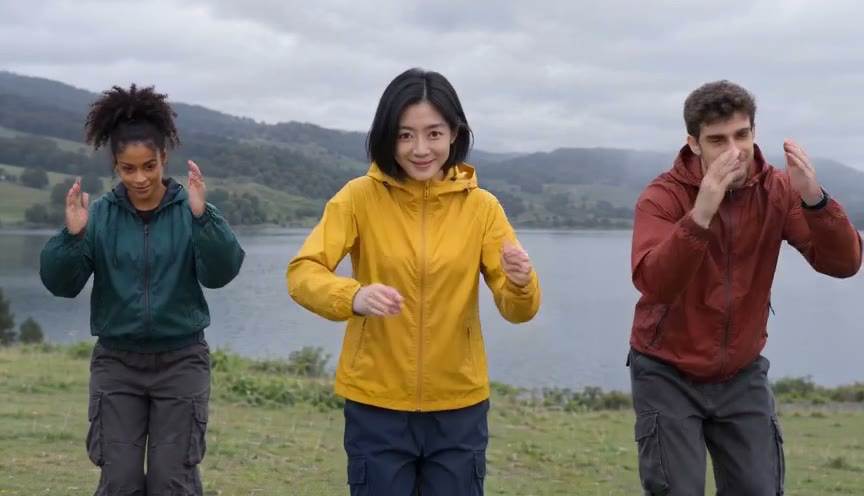
Because the Swiss Side Quest choreography includes both a tight front close-up at 0:04 and a wide hillside shot at 0:11, the model needs clear facial geometry and uncluttered clothing cues.
| Category | Works Best | Avoid |
|---|---|---|
| Subject count | One consenting adult per uploaded image | Multi-person group photos or cropped party shots with extra faces |
| Head angle & framing | Front-facing head-and-shoulders or upper-body portrait looking near the camera | Extreme side profiles, tilted chin-down angles, or distant tiny faces |
| Lighting | Soft natural daylight or even indoor lighting across both sides of the face | Harsh shadows over the eyes, strong window backlight, or neon color casts |
| Face clarity | Unobstructed eyes, nose, and mouth with natural skin texture | Sunglasses, face masks, hands covering the mouth, or heavy smoothing filters |
| File specs | Clean JPG, PNG, or WebP up to 3 MB and at least 340 px on the short edge | Low-res thumbnails under 340 px, heavy JPEG compression, or ultra-wide banners over 2.5:1 |
How each choreography shot uses your portrait
- 0:00 Head Bop & 0:07 Hillside Walk: The model blends your head, hair silhouette, and jacket or top color into natural full-body hillside motion. Clear shoulder and outfit contrast helps keep your look consistent across cuts.
- 0:04 Lead Close-Up: This is the highest-scrutiny moment in the clip. A sharp, evenly lit center lead photo makes the smile and eye contact feel natural instead of soft or generic.
- 0:11 Wide Groove: Distinct jacket or shirt colors between the center, left, and right dancers make the trio immediately readable even when the camera pulls back across the meadow.
Output specs: 480p vs. 720p and 16:9 vs. 9:16
Before starting a render on the homepage studio, choose the resolution and aspect ratio that match where you plan to post:
| Setting | Option A | Option B | How to Choose |
|---|---|---|---|
| Resolution | 480p (lower credit cost) | 720p (sharper detail for close-ups) | Use 480p for quick tests or casual chats; choose 720p for TikTok, Reels, or Shorts uploads |
| Aspect Ratio | 9:16 Portrait | 16:9 Landscape | Use 9:16 for full-screen mobile feeds (TikTok, Reels, Shorts); choose 16:9 for YouTube, desktop sharing, or wide hillside framing |
| Duration | 15 seconds | 15 seconds | Fixed to match all four Swiss Side Quest choreography beats |
| Audio | Silent MP4 | Silent MP4 | Designed so you can attach official trending audio inside your social app |
Why the homepage sample has sound while downloads are silent
- Homepage sample (
864 × 496, 15 seconds): The studio preview and input-to-output comparison play the same AI-generated clip with audio. Use it to hear the rhythm of the four shots before spending credits. - Your personalized MP4 download: Your clip downloads as a silent MP4. You can add a sound available in your publishing app and align it to the moves before posting.
What song is used in the original Wassup dance?
The viral Swiss Side Quest hillside video posted by Niana Guerrero on October 24, 2026 uses the Jersey club remix of "From Time" credited to zbee.
If you search inside TikTok or Instagram Reels, look for "From Time" zbee or tap the audio disc at the bottom-right corner of Niana's original TikTok to save the sound to your favorites. When you upload your silent 15-second MP4, align the opening beat with 0:00 so the 0:04 close-up and 0:07 hillside walk hit on rhythm.
Troubleshooting common issues
| Issue | Likely Cause | How to Fix It |
|---|---|---|
| Upload rejected before generation | File exceeds 3 MB, short edge is under 340 px, or unsupported format | Export as JPG, PNG, or WebP at 600 px to 1500 px wide under 3 MB |
| Content moderation blocked the photo | Minor detected, unauthorized use of a public figure's image, or restricted visual content | Replace with a clear photo of a consenting adult you have permission to use |
| Face looks softer than expected | Backlit selfie, heavy beauty filter, or face too small in frame | Switch to a closer, front-facing daylight portrait with crisp eye detail |
| Two people swapped or blended | Group photo uploaded into a solo slot | Upload one solo portrait per dancer slot (Center, Left, Right) |
| Render failed mid-queue | Provider timeout or technical rejection | Your reserved credits are returned automatically; check your balance and retry |
Privacy, retention, and credit refund rules
- Private by default: Only your signed-in account can play or download your generated clips in My videos. Other visitors never see your uploaded photos or outputs.
- 14-day download window: Private MP4 delivery links stay valid for 14 days. Save your video to your phone or computer before the link expires.
- 24-hour local draft: Unsubmitted photos remain only in your browser's local draft for up to 24 hours and can be cleared anytime.
- Automatic refunds on confirmed failures: Technical failures and provider rejections automatically restore your reserved credits. Completed videos that you decide to retry with a new photo use new credits. See our Privacy Policy and Refund Policy for full terms.
Ready to make your clip? Open the homepage studio, check the step-by-step dance guide, or compare one-time credit packs on Pricing.